Browser starter
The SDK, a working QuickStart.html, interactive demo and ASP.NET server samples.
Download SDK · v0.4Start with QuickStart.html · No model key required RichScripts
RichScripts AI Action SDK is a JavaScript toolkit for developers. It adds a chat-style control panel to your software so users can find records, open screens, or request an approved change by typing a short instruction.
For example: a user types “Show open requests”, and your application displays the matching requests. Your code defines the actions the assistant can perform.
Try the interactive demo → Get the SDK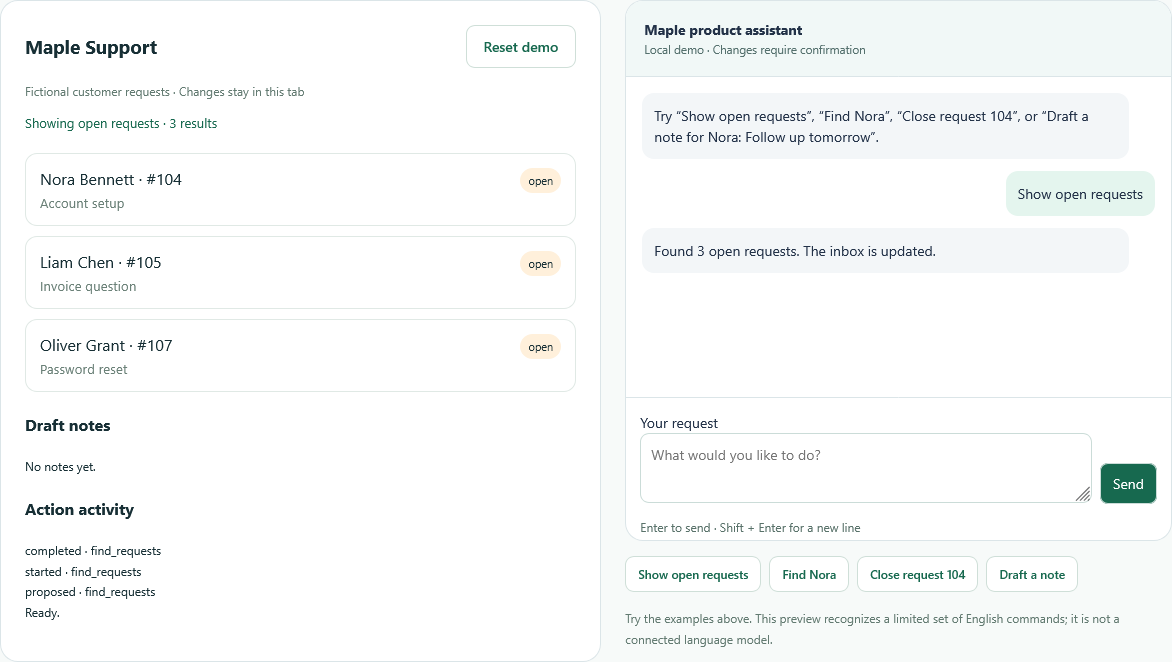
An SDK is a software development kit: code you add to an application you are building. This SDK provides the assistant interface, an action registry, argument checks, and confirmation cards. You connect those actions to the features and APIs your application already has.
Developers building SaaS dashboards, customer portals, admin panels, and internal tools.
A simple way to search or navigate by typing requests, with a review step before changes.
Your resolver maps a request to a registered action. Your application checks access and runs that action.
Start with local commands, or connect a model through your own server for flexible language understanding.
What you can try today: this page uses fixed commands and fictional records. The ZChat and MyLiveChat integrations support real read actions or dashboard navigation. Model inference and production write actions require additional application integration.
Explore the three steps, then try them in the working demo below.
Users reach existing search features with a short command, without hunting through menus.
A short command filters the inbox and displays matching requests.
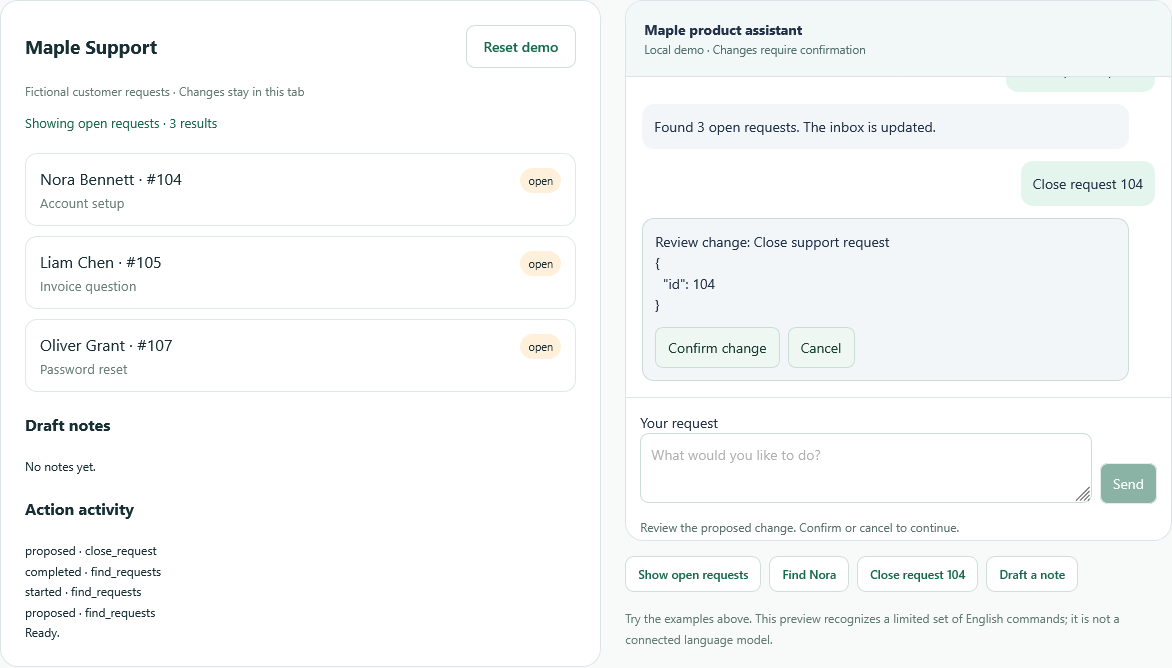
See the proposed action and its arguments. Confirm or cancel before anything changes.
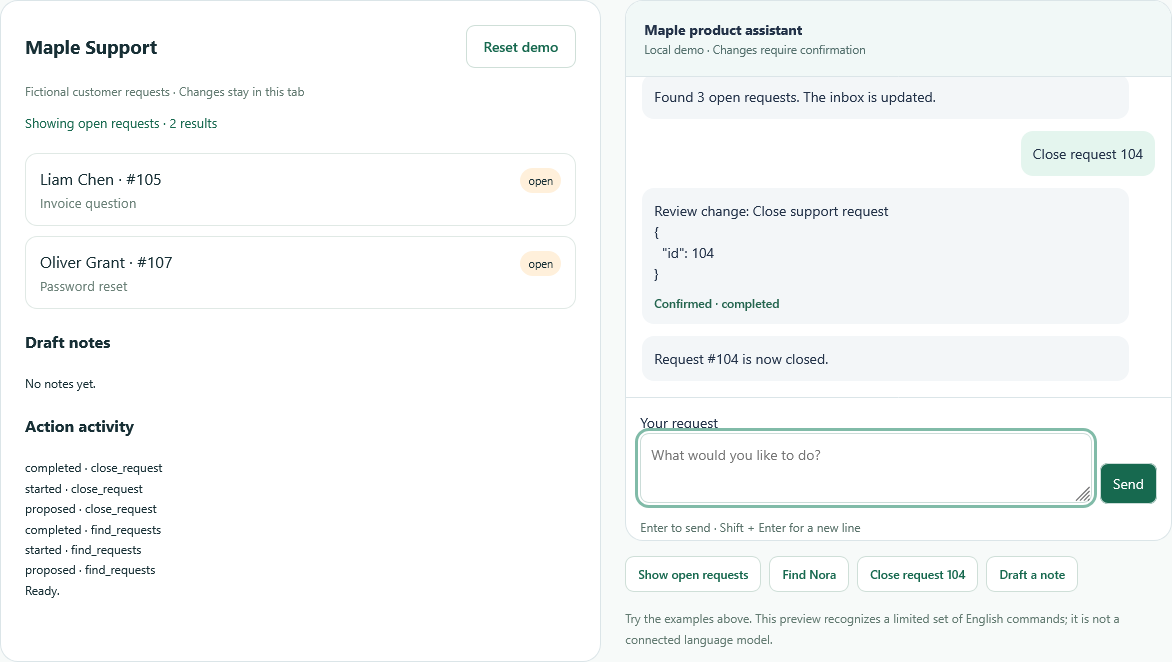
After confirmation, the sample record updates and the activity log records completion.
Actual SDK screenshots · Fictional records · Local scripted demo · Click a screenshot to enlarge
Try these steps yourself →Watch the application change as you talk to the assistant.
Fictional customer requests · Changes stay in this tab
Try the examples above. This preview recognizes a limited set of English commands; it is not a connected language model.
Filter all, open or closed requests.
Read only · ImmediateSearch the sample inbox by name.
Read only · ImmediateReview the numbered request before changing it.
Write · Confirmation requiredSave a customer note in this tab.
Write · Confirmation requiredThe application defines this action catalog. Requests to run arbitrary code or unregistered actions are rejected by the SDK.
Try a working local command first, then connect the assistant to your application’s existing features.
The SDK, a working QuickStart.html, interactive demo and ASP.NET server samples.
Download SDK · v0.4Start with QuickStart.html · No model key requiredZChat’s React inbox and MyLiveChat’s classic ASP.NET dashboard adapters, with the complete deployment walkthrough.
Read integration examples →Existing login and application APIs requiredNo build tool or AI service is needed for this example. Open it locally or serve it from your application.
Keep authorization on your server. Local commands are a starting point; flexible AI understanding requires your own resolver and provider configuration.
<div id="assistant"></div>
<p id="result" role="status">Ready.</p>
<script src="richscripts-actions.js"></script>
<script>
RichScriptsActions.mount({
  target: '#assistant',
  welcome: 'Type "Show status" to try a read action.',
  resolve: async ({ message }) =>
    message.trim().toLowerCase() === 'show status'
      ? { action: 'show_status', arguments: {} }
      : { message: 'Try "Show status".' },
  actions: [{
    name: 'show_status',
    readOnly: true,
    parameters: { type: 'object', properties: {}, required: [] },
    execute: () => {
      // Replace this sample read with an authorized host API call.
      document.querySelector('#result').textContent = 'Demo status: ready.';
      return 'The status is displayed in your application.';
    }
  }]
});
</script>These samples use authenticated classic ASP.NET and fictional session records. Inference uses your own model key and incurs provider costs; production writes need your application’s transactions, permissions and durable audit trail.
The starter ZIP now includes an authenticated ASP.NET page, model resolver, proposal executor and session data store. Configure your own model key to try real language-to-action requests on fictional records.
server-sample/ inside your existing signed-in ASP.NET application.ConnectedDemo.aspx after signing in.These server examples are downloadable source, not active RichScripts customer endpoints. Model calls incur your provider costs. The public demo above remains local and free of API calls.
RichScripts AI Action SDK is a developer component for adding a conversational interface to a web application. Instead of treating every request as an open-ended chat, the application defines a small catalog of actions with named parameters. These actions can search records, change the visible view, prepare a note or request an update to an existing item. The assistant helps users reach the features that already exist in your product.
The preview on this page runs entirely in the browser using fictional support requests and a scripted resolver. It demonstrates the interaction without sending messages to a language model. Reloading the page restores the sample inbox. An integration can keep explicit local commands or supply a server-side resolver backed by the model or local inference service chosen by the developer. The browser communicates with your application endpoint; model credentials remain on the server.
Action schemas describe allowed argument types and values. The prototype validates flat string, integer and boolean fields, rejects unknown fields, and checks required arguments. It does not implement the complete JSON Schema standard. Your backend must repeat validation and use the authenticated user's identity to select records and check permissions. Browser-side checks improve interaction but cannot authorize a database change.
Read-only actions can execute immediately. Actions that modify state show the proposed arguments and ask the user to confirm or cancel. A production executor should bind this approval to the proposed action, enforce it on the server and use idempotency keys for retries. The connected sample binds proposals to the signed-in user, keeps separate pending operations across tabs, supports server cancellation, checks their five-minute expiry and returns cached results for duplicate execution requests. Its session data is fictional; real applications still need database transactions, tenant authorization and durable idempotency. The SDK reports action activity through callbacks so developers can connect their own audit trail.
The initial release uses vanilla JavaScript and an isolated component style, with no framework dependency. It includes a model resolver, a sample executor and a connected ASP.NET page, with fictional session data for installation inside an authenticated application. This is a developer preview intended for evaluation and integration experiments. Pricing and a production support policy will be published after the component has been tested against real application workflows.
You can try the demo here, but installing the SDK in your own product requires development work. It is a toolkit for building an assistant inside existing software.
No. Local command mode needs no model calls. If you connect a model, you supply the provider or local service, credentials, billing and usage limits on your server.
No. It uses a limited scripted resolver so you can test the workflow without API costs. Your production server supplies model inference.
The SDK dispatches registered action names only. Your server must separately authorize every action and validate its arguments.
The JavaScript component is framework independent. The downloadable classic ASP.NET handler demonstrates the resolver contract; authentication and execution remain application responsibilities.