
CuteEditor buttons and menus
This section contains reference documentation for each of the toolbars.

| Menu/Button | Function Description | Template Item |
 Save Save |
Saves the active content in the editor's content area | Save |
 New Document New Document |
Creates a new document | New |
 Print Print |
Prints the current page. | |
 Preview Preview |
Previews the current page. | Preview |
 Find and replace Find and replace |
Finds and allows replacements of text in the editor's content area. | Find |
 Full-Screen Full-Screen |
Edits in full screen mode, maximizing your available space. | ToFullPage FromFullPage |
 Code Cleaner Code Cleaner |
Cleans up all "garbage" HTML-tags. | CleanCode |
 Spell Spell |
Launchs the spell checker. | netspell |
 Cut Cut |
Performs normal function of cutting. | Cut |
 Copy Copy |
Copies the current selection and stores it in the clipboard. | Copy |
 Paste Paste |
Inserts content from the clipboard into the editor at the selected position. | Paste |
 Paste Plain Text Paste Plain Text |
Pastes plain text (no formatting) into the editor. | PasteText |
 Paste from word Paste from word |
Pastes the content copied form the Microsoft Word and removes any web-unfriendly tags. | PasteWord |
 Paste as HTML Paste as HTML |
The content will be inserted into Cute Editor as HTML source. | PasteAsHTML |
 Delete Delete |
Deletes the current selection. | Delete |
 Undo Undo |
Undoes the last operation in the editor. | Undo |
 Redo Redo |
Redoes the previously undone action. | Redo |
 Insert Page Break Insert Page Break |
Inserts a print page break | InsertPageBreak |
 Insert the current date Insert the current date |
Inserts the current date. The date format used is the date format configured on the client's machine. | InsertDate |
 Insert the current time Insert the current time |
Inserts the current time. The time format used is the time format configured on the client's machine. | InsertTime |
 Insert Emotion Insert Emotion |
Inserts an emotion image at the selected position in the editor. | InsertEmotion |
 Universal Keyboard Universal Keyboard |
Universal Online Keyboard. | UniversalKeyboard |
 Box Formatting Box Formatting |
Box Formatting. | BoxFormatting |
 insert a layer insert a layer |
Allows you to insert a layer (absolutely-positioned div). | InsertLayer |
 Visible Borders Visible Borders |
Makes table borders visible, which can make editing easier. | ToggleBorder |
 Special Chars Special Chars |
Inserts a special character from a predefined list. | InsertChars |
 GroupBox GroupBox |
Allows you to a group box (FieldSet) at the selected position in the editor. | InsertFieldSet |
 Insert Image Insert Image |
Inserts a local image from the image gallery folder; thumbnail images are dynamically created and supports uploading of new images. | ImageGalleryByBrowsing |
 Insert Image Insert Image |
Inserts an image at the selected position in the editor and allows you to set it's properties. | InsertImage |
 Insert Flash Insert Flash |
Inserts a Flash Animation at the selected position and allows you to set it's properties. | InsertFlash |
 Insert Media Insert Media |
Inserts a Windows Media object at the selected position and allows you to set it's properties. | InsertMedia |
 Insert Document Insert Document |
Inserts a link to a document on the server (PDF,DOC, ZIP,etc.) at the selected position . | InsertDocument |
 Insert Template Insert Template |
Loads the predefined templates into the current selection. | InsertTemplate |
 YouTube YouTube |
Embed a youtube video | YouTube |
 Insert Table Insert Table |
Inserts a table into your web page. | TableDropDown |
 Insert Rows Insert Rows |
Inserts a row above the selected row in a table. | InsertRowTop |
 Insert Row Below Insert Row Below |
Inserts a row below the selected row in a table. | InsertRowBottom |
 Delete Rows Delete Rows |
Deletes the selected row in a table. | DeleteRow |
 Insert Column to the Left Insert Column to the Left |
Inserts a column to the left of the selected cell in a table. | InsertColumnLeft |
 Insert Column to the Right Insert Column to the Right |
Inserts a column to the right of the selected cell in a table. | InsertColumnRight |
 Delete columns Delete columns |
Deletes the selected column in a table. | DeleteColumn |
 Insert cells Insert cells |
Inserts cells into the selected row in a table. | InsertCell |
 Delete cells Delete cells |
Deletes the selected cell in a table. | DeleteCell |
 Row properties Row properties |
Edits row properties of a table. | EditRow |
 Cell properties Cell properties |
Edits cell properties of a table. | EditCell |
 Merge right Merge right |
Merges the current cell with the cell to its right. | MergeRight |
 Merge below Merge below |
Merges the current cell with the cell below it. | MergeBottom |
 Horizontal split Horizontal split |
Splits a cell into columns. | HorSplitCell |
 Vertical split Vertical split |
Splits a cell into rows. | VerSplitCell |
 Break Break |
Inserts a line break. | Break |
 Paragraph Paragraph |
Inserts a paragraph | InsertParagraph |
 Direction left to right Direction left to right |
Direction of text is left to right. | BlockDirLTR |
 Direction right to left Direction right to left |
Direction of text is right to left. | BlockDirRTL |
 Form Form |
Inserts a form at the selected position. | InsertForm |
 TextArea TextArea |
Inserts a textarea at the selected position. | InsertTextBox |
 Input Text Box Input Text Box |
Inserts an input text box at the selected position. | InsertInputText |
 Password field Password field |
Inserts a password field at the selected position. | InsertInputPassword |
 Hidden field Hidden field |
Inserts a hidden field at the selected position. | InsertInputhidden |
 ListBox ListBox |
Inserts a list box at the selected position. | InsertListBox |
 Dropdown Box Dropdown Box |
Inserts a dropdown box at the selected position. | InsertDropDown |
 Radio Button Radio Button |
Inserts a radio button at the selected position. | InsertRadioBox |
 Checkbox Checkbox |
Inserts a checkbox at the selected position. | InsertCheckBox |
 Image Button Image Button |
Inserts an image button at the selected position. | InsertInputImage |
 Submit Button Submit Button |
Inserts a submit button at the selected position. | InsertInputSubmit |
 Reset Button Reset Button |
Inserts a reset button at the selected position. | InsertInputReset |
 Input Button Input Button |
Inserts aninput button at the selected position. | InsertInputButton |
 Page Properties Page Properties |
Allows you modify the page properties. | DocumentPropertyPage |
 Bold Bold |
Bolds the selected text. | Bold |
 Italicize Italicize |
Italicizes the selected text. | Italic |
 Underline Underline |
Underlines the selected text. | Underline |
 Left Justify Left Justify |
Aligns the selected content to the left. | JustifyLeft |
 Center Center |
Centers the selected content. | JustifyCenter |
 Right Justify Right Justify |
Aligns the selected content to the right | JustifyRight |
 Justify Full Justify Full |
Justify Full. | JustifyFull |
 Justify None Justify None |
Justify None. | JustifyNone |
 Remove Format Remove Format |
Removes formatting from the selected text. | RemoveFormat |
  Font Color Font Color |
Changes the color of the selected text to desired color. | ForeColor |
 Highlight Highlight |
Highlights the selected text. | BackColor |
 Ordered List Ordered List |
Inserts an ordered list. | InsertOrderedList |
 Unordered List Unordered List |
Inserts an unordered list. | InsertUnorderedList |
 Indent Indent |
Indents the selected content. | Indent |
 Outdent Outdent |
Outdents the selected content. | Outdent |
 Subscript Subscript |
Changes the selected text to subscript. | Subscript |
 Superscript Superscript |
Changes the selected text to superscript. | Superscript |
 Strike Through Strike Through |
Strikes through the selected text. | Strikethrough |
 Upper Case Upper Case |
Converts the selected text to upper case lettering. | Ucase |
| Lower Case |
Converts the selected text to lower case lettering. | Lcase |
 Insert Rule Insert Rule |
Inserts a horizontal rule at the selected position in the editor. | InsertHorizontalRule |
 Insert Link Insert Link |
Adds a link to the text on your page. | InsertLink |
 Add image map Add image map |
Adds an image map. | ImageMap |
 Remove Link Remove Link |
Removes the hyperlink from the selected content. | Unlink |
 Insert Anchor Insert Anchor |
Adds an anchor to the text on your page. | InsertAnchor |
 Absolute Position Absolute Position |
Fly text, pictures, tables... allows you to position any element anywhere on your page. | AbsolutePosition |
 Bring Forward Bring Forward |
Brings an item one position forward at a time. | BringForward |
 Send Backward Send Backward |
Sends an item one position backwards at a time. | BringBackward |
| Toggle Border |
Toggles the visibility of borders. | ToggleBorder |
 Select All Select All |
Selects all content. | SelectAll |
 Select None Select None |
Selects no content. | SelectNone |
 SyntaxHighlighter SyntaxHighlighter |
Allows you to easily post syntax highlighted code. | SyntaxHighlighter |
 Help Help |
Returns a help Toolbar Button. The help page URL is set by the HelpUrl Property. | Help |
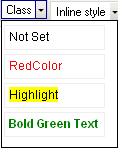 |
Cass drop-down menu changes the CSS class of the selected text. | CssClass |
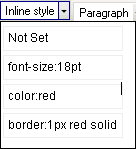 |
Inline Style drop-down menu changes the CSS style of the selected text. | CssStyle |
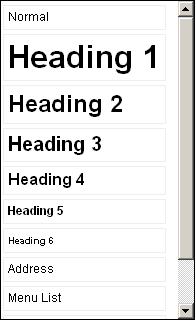 |
Paragraph drop-down menu changes the paragraph style of the selected text. | FormatBlock |
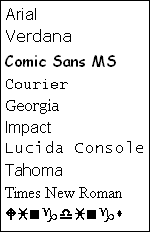 |
Font drop-down menu sets the font face. If a selection is active, the font formatting will be applied to it. | FontName |
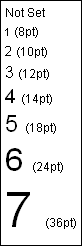 |
Size drop-down menu sets the font size. If a selection is active, the font size formatting will be applied to it. | FontSize |
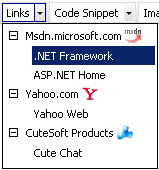 |
Inserts predefined links in the current selection. | LinkTree |
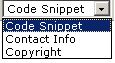 |
Inserts predefined HTML code snippets in the current selection. | Codes |
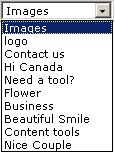 |
Inserts predefined images in the current selection. | Images |
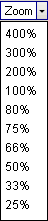 |
Zoom drop-down menu allows selection of zoom-factor to your workspace. | Zoom |